
Exporting Instagram Content in High Resolution: Essential Techniques
In today’s digital landscape, Instagram has emerged as one of the most popular platforms for sharing images and videos. It’s crucial for creators, brands, and businesses to ensure that their content maintains its quality when exported from Instagram. This article will explore the various methods available to export Instagram content in high resolution and offer tips on maximizing the quality of your visual assets.
Understanding Instagram’s Image and Video Compression
Before diving into the methods of exporting content, it’s important to understand how Instagram handles your uploads. Instagram applies compression algorithms to reduce the file size of images and videos, which can lead to a loss in quality. The platform supports different image formats, including JPEG, PNG for images, and MP4 for videos, but it alters these files to optimize loading times and protect bandwidth.
Best Practices for Uploading High Quality Content
To retain as much quality as possible, follow these guidelines when uploading your content:
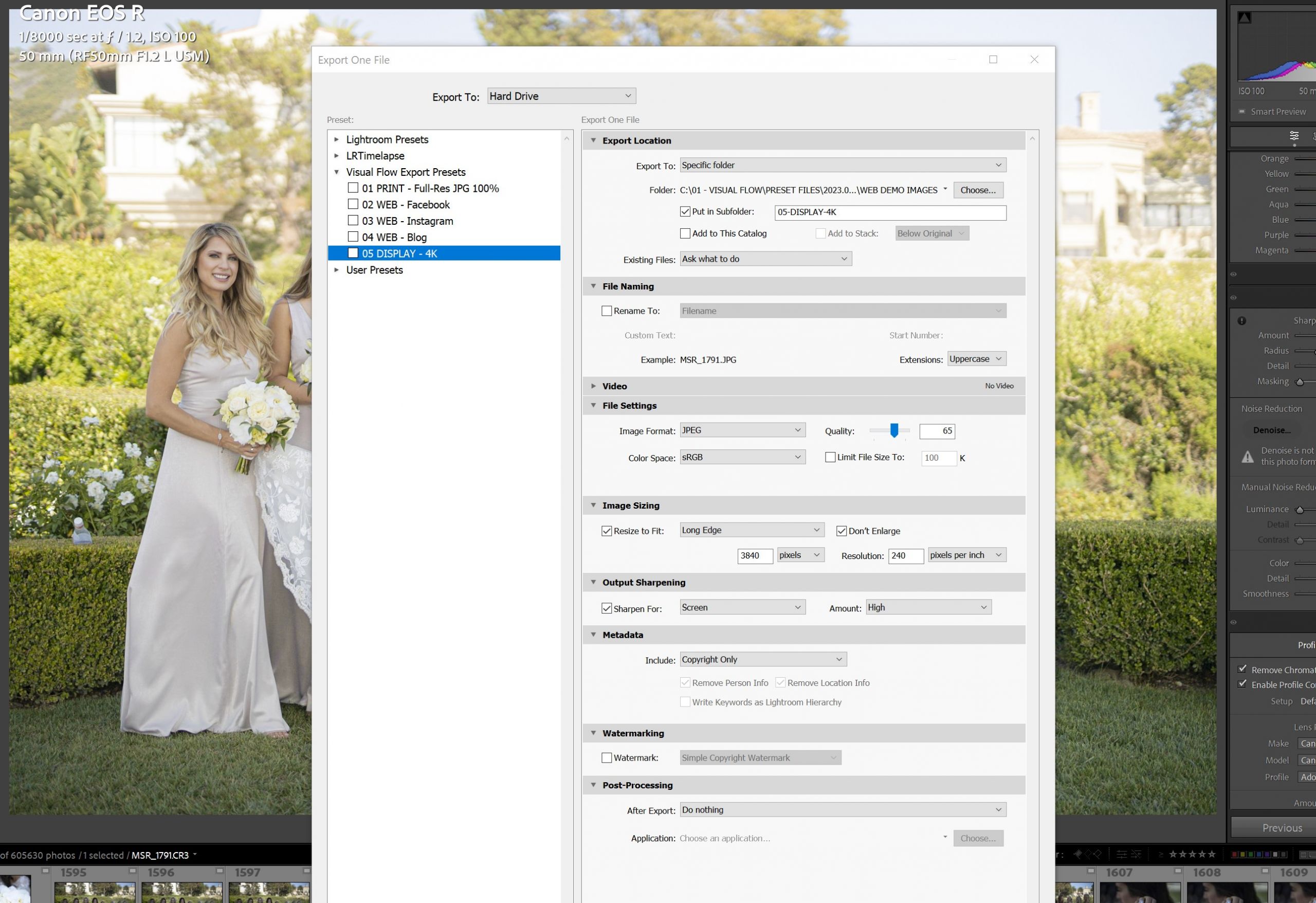
- Optimal Image Sizes: Use the recommended image sizes for different post types. For example, for a square post, use 1080 x 1080 pixels, while for a landscape post, the recommended size is 1080 x 566 pixels.
- Use High-Quality Formats: For images, consider using the JPEG format and ensure they are saved with maximum quality. PNG is recommended for images with transparency.
- Minimize Excessive Edits: Too many edits can degrade the quality of your image. Aim for minimal adjustments before uploading to retain the original look.
- Video Quality Settings: When uploading videos, use MP4 format with H.264 codec. Ensure that your video resolution is at least 1080p.
Downloading Your Own Content in High Resolution
If you want to download your own content in high resolution, you can do this directly through the Instagram app or website. Here’s how:
- Open the Instagram app and navigate to your profile.
- Select the post you want to download.
- Tap on the three dots on the top right corner, and if you’re using the mobile app, select “Copy Link.” For desktop users, there will be an option to save to your device.
- Use an image downloader tool or website that supports high-resolution downloads by inputting the copied link.
Using Third-Party Apps and Tools
Several third-party apps and tools can help you export your Instagram content in high resolution:
- 4K Stogram: This tool allows you to download images and videos from Instagram profiles in bulk. It retains the original quality of files upon downloading.
- SaveStory: If your focus is on high-resolution stories, SaveStory is a great option. It allows you to save stories in their original quality effortlessly.
- Instagram Image Downloader: Various online tools can help you download Instagram images and videos directly. Make sure to check their quality settings and preferred output formats.
Exporting Instagram Highlights
Instagram Stories can be saved as Highlights on your profile, but the exported quality still depends on the original quality of your stories. To enhance the quality of your Highlights:
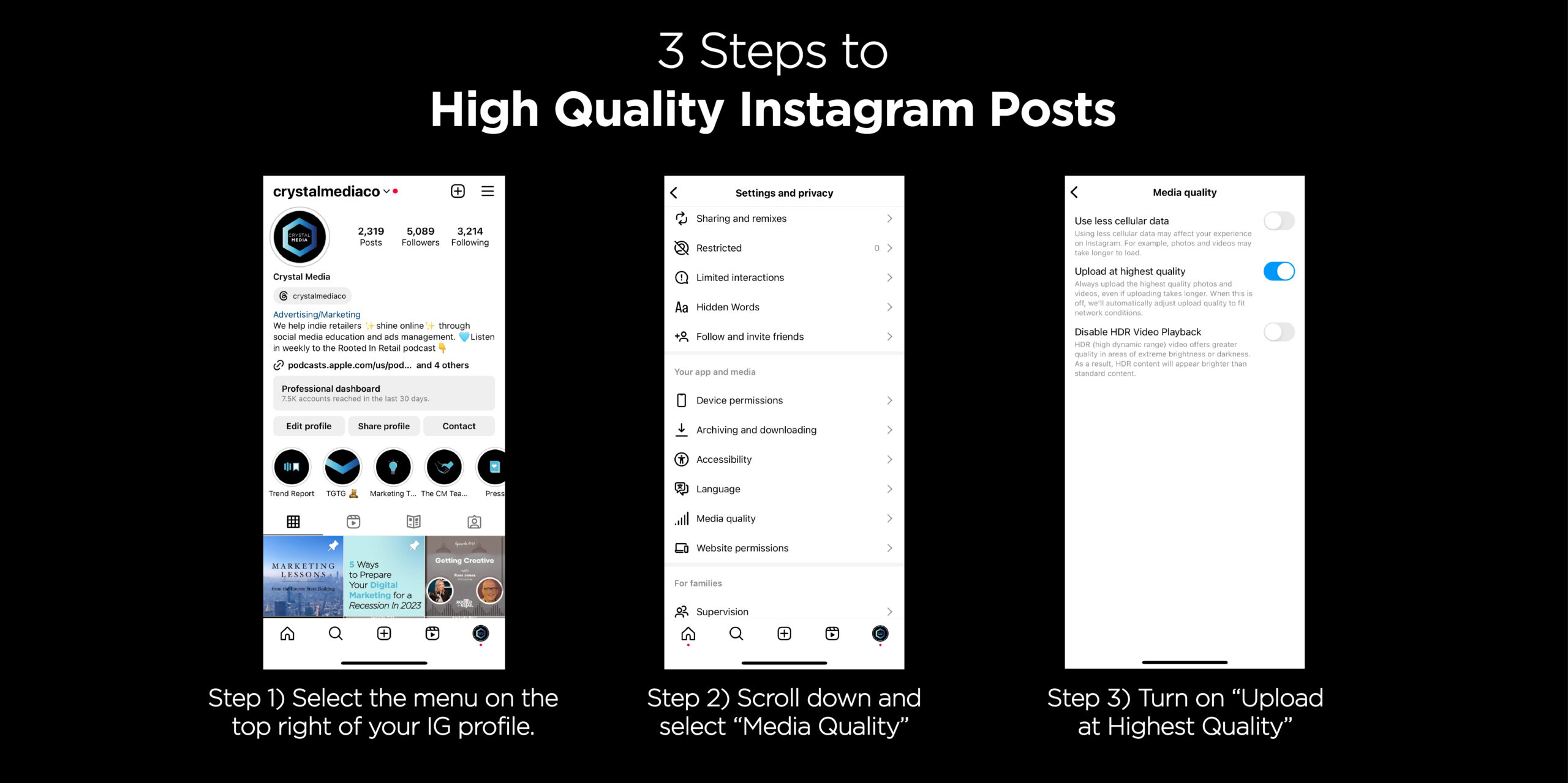
- Ensure the stories are recorded and uploaded in high resolution.
- Use the options provided by third-party applications to export the highlights while preserving quality.
Best Formats for Exporting Content
Choosing the right format is crucial for maintaining the quality of your content. Here’s a breakdown of formats recommended for Instagram:
- JPEG: This is the standard format for photos on Instagram, ideal for colorful images.
- PNG: Best for images requiring transparency and for high-quality graphics.
- MP4: Preferred format for videos, ensuring high quality and compatibility.
Maintaining Copyrights while Exporting Content
When exporting Instagram content, it’s vital to respect copyright laws. If you’re downloading content from other users, ensure that you have permission to do so:
- Always seek permission from the creator if you want to repurpose their content.
- Give credit where it’s due, tagging the original creator in your reposts.
- Be aware of Instagram’s terms regarding the use of content and the implications of copyright infringement.
Conclusion: Ensuring High-Quality Exports
Exporting Instagram content in high resolution is not only a matter of using the right tools but also following best practices during uploads. By adopting the guidelines outlined in this article, creators can ensure their visual content remains vibrant and engaging, effectively showcasing their work across platforms. Whether you use native methods or third-party applications, maintaining fidelity is key to your brand identity and audience engagement.